
Creating beautiful portraits is both an art and a craft. Whether you’re a beginner photographer, a retoucher, or a creative professional, you’ve probably realized how much time it takes to polish a portrait by hand. Skin smoothing, color correction, frequency separation, light enhancement, and detail sharpening can take hours when done manually. This is where Portrait Retouching Photoshop Actions truly shine. These powerful tools simplify your workflow, speed up your editing process, and help you achieve clean, professional-looking results with just a few clicks.
If you’re exploring options before investing in retouching tools, you’re in the right place. In this article, we’ll dive deep into what makes Portrait Retouching Photoshop Actions so essential, especially for photographers and editors who want consistent quality across their images. Whether you’re editing for clients, social media, e-commerce, magazines, or your personal creative projects, these actions can transform your entire workflow.
Before we explore the top ten must-have tools, it’s important to understand why the demand for Portrait Retouching Photoshop Actions has grown so quickly in recent years. The rise of digital photography, influencer culture, and online branding has made professional retouching a necessity rather than a luxury. People now expect polished portraits, whether it’s for LinkedIn, Instagram, or commercial campaigns. And because not everyone has the time or skill to retouch images manually, Photoshop actions have become the bridge between artistic quality and practical efficiency.
Understanding the Power of Portrait Retouching Photoshop Actions
At their core, Portrait Retouching Photoshop Actions are pre-recorded steps that automatically apply a series of adjustments to your images. These adjustments can include everything from smoothing skin and enhancing eyes to adjusting color balance, contrast, and overall tones. This automation doesn’t just save time-it ensures consistency across every project you work on.
For professional photographers, consistency is essential. When clients expect a specific look or style from your portfolio, actions allow you to recreate that same polished effect every single time. They remove guesswork and reduce the number of repetitive tasks you perform during editing sessions.
Another major advantage is accessibility. Not every photographer is a Photoshop expert. Some may struggle with advanced techniques like dodge and burn, frequency separation, and color grading. However, with Portrait Retouching Photoshop Actions, you can achieve the same high-level results without needing years of Photoshop experience.
These actions also serve as learning tools. When you run an action, you’re able to see each adjustment layer, mask, and filter used. This allows beginners to study advanced retouching workflows and gradually incorporate them into their own editing process. So even if you start with actions, you’re naturally leveling up your skills.

The Key Elements That Make a Great Portrait Retouching Photoshop Action
Not all actions are created equal. When comparing different Portrait Retouching Photoshop Actions, you should pay attention to a few essential qualities.
One important factor is adjustability. Good actions don’t flatten your image or restrict your editing capabilities. Instead, they create editable layers so you can fine-tune every result. Another key element is realism. Over-retouched portraits are no longer considered professional, especially in a world that values natural beauty and authenticity. Look for actions that preserve skin texture instead of blurring it.
Speed is another consideration. Some actions use heavy filters and dozens of layers, which can slow down your system. High-quality actions are optimized for performance and won’t freeze your workflow.
Versatility matters too. Some actions work best on RAW files, while others are more suitable for JPEGs. Some are designed for studio portraits, while others work better outdoors or in natural light. The best Portrait Retouching Photoshop Actions are flexible enough to handle different lighting conditions, skin tones, and creative styles.
Finally, customer support, documentation, and video tutorials can make a huge difference-especially for beginners. When you’re investing in professional tools, you want to make sure the developer stands behind their product.
Why Photographers and Editors Rely on Portrait Retouching Photoshop Actions
Professional portrait editing requires precision. Whether you’re working with a high-end beauty shoot or a casual lifestyle session, the small details matter. Eye clarity, skin tone uniformity, lip color, and shadow depth all contribute to a polished final result. Doing this manually for dozens or hundreds of images can take more time than the photoshoot itself.
That’s why Portrait Retouching Photoshop Actions are so valuable. They simplify complicated processes like frequency separation, eye enhancement, color correction, and dodge and burn. They help maintain a natural yet refined look, which is especially important in industries like fashion, wedding photography, editorial work, corporate branding, and social media content creation.
Another reason photographers rely on actions is client expectation. In today’s visual world, clients want fast turnaround times without sacrificing quality. With actions, you can deliver high-quality edits quickly, which improves your workflow and customer satisfaction.
Even digital creators who work with smartphone photography can benefit from using Photoshop actions. Once the photo is imported into Photoshop, the action does the heavy lifting, ensuring the image looks magazine-ready with minimal effort.
The 10 Must-Have Portrait Retouching Photoshop Actions
In this section, we’ll walk through ten essential types of Portrait Retouching Photoshop Actions that every photographer or editor should consider adding to their toolkit. These categories cover everything from basic retouching to advanced beauty enhancements, giving you a full range of editing power.
1. Skin Smoothing and Texture Preserving Actions
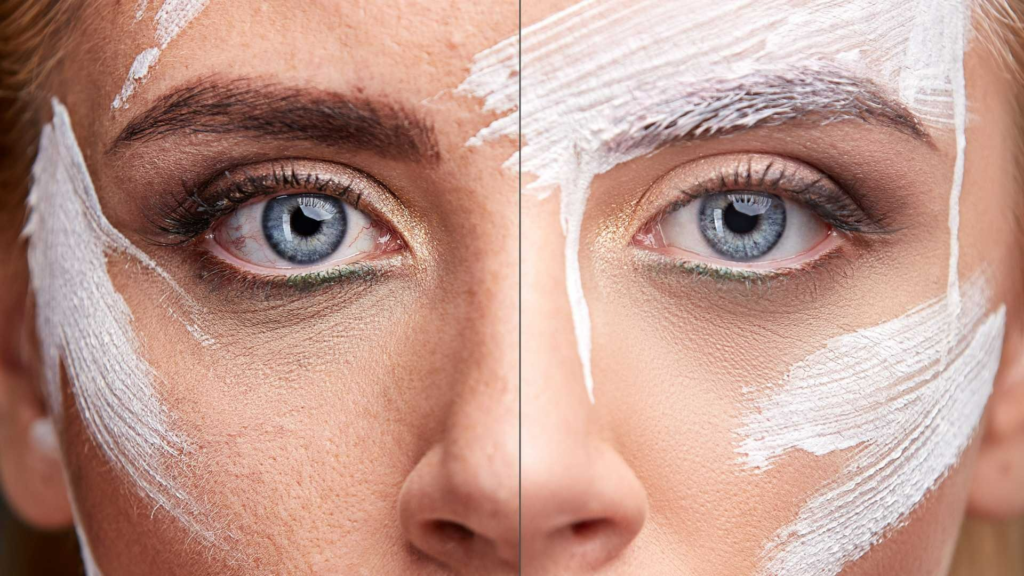
One of the most important tools in any portrait workflow is a reliable skin-smoothing action. High-quality Portrait Retouching Photoshop Actions for skin smoothing do more than blur imperfections-they preserve natural texture while gently reducing blemishes, fine lines, and uneven patches. The best actions use frequency separation or micro-dodge-and-burn techniques to maintain realism. This allows you to enhance the portrait without making it look plastic or overly edited. Reliable skin-smoothing actions also help create uniform lighting across the face, a common challenge when shooting in natural light or mixed environments.
These actions are essential for beauty photography, model portfolios, wedding portraits, and even everyday lifestyle shoots. When comparing different products, look for smoothing actions that give you control through adjustable layers. This enables you to customize the level of retouching based on the client’s needs without altering the original image. Since the goal is professional-quality results, natural texture retention is key.
2. Frequency Separation Actions
Frequency separation has become a standard in high-end retouching, but it’s also one of the most time-consuming processes to set up manually. This is why many professionals depend on Portrait Retouching Photoshop Actions specifically designed for frequency separation. These actions create the low and high-frequency layers instantly, giving you full control over color transitions and skin texture.
What makes frequency separation so effective is its ability to address two problems at once: uneven tones and rough texture. By separating these elements, you can smooth blotchy areas without disturbing pores, freckles, or fine details. This is particularly useful for corporate headshots, editorial shoots, and beauty campaigns where flawless skin is expected but realism must be preserved.
When choosing a frequency separation action, pay attention to whether it uses Gaussian blur or Median blur, as both create slightly different outcomes. Also look for actions that support both 8-bit and 16-bit images since this affects the level of detail and overall smoothness.
3. Eye Enhancement Actions
The eyes are often the focal point of any portrait, which is why eye enhancement actions are among the most popular Portrait Retouching Photoshop Actions available today. These actions brighten the whites of the eyes, sharpen the irises, enhance color tones, and remove redness or small imperfections. They add life and vibrancy to the portrait without making the subject look artificial or over-edited.
Professional eye enhancement actions usually include multiple adjustment layers so you can tweak intensity. This ensures that you can achieve anything from soft, natural enhancement to bold, dramatic eyes depending on the shoot’s creative direction. Whether you’re editing fashion portraits, beauty close-ups, or simple personal portraits, enhanced eyes dramatically improve the overall impression of the image.
Investing in eye enhancement tools is particularly beneficial for photographers who shoot in low light or studio environments where catchlights need a little extra boost. These actions save time and ensure consistent results across entire client galleries.
4. Teeth Whitening and Smile Enhancement Actions
Smile-related touch-ups can be delicate. You want a polished look without over-brightening the teeth to a stark white. This is where smile enhancement actions become extremely useful. High-quality Portrait Retouching Photoshop Actions for teeth whitening provide subtle, natural results by targeting only the necessary highlights and reducing unwanted yellowness.
These actions are especially helpful for wedding photographers, portrait studios, senior photo sessions, and corporate headshots. A bright, clean smile contributes significantly to the overall appeal of a portrait. Good smile enhancement actions give you control over the level of whitening so you can match the client’s preferences. The best tools also include gum color correction and lip enhancement options, adding more depth to your editing capabilities.
5. Dodge and Burn Actions
Dodge and burn is one of the most powerful techniques in portrait retouching, yet it’s also one of the most time-consuming to do manually. With dedicated dodge-and-burn Portrait Retouching Photoshop Actions, you can create balanced highlights and shadows that enhance facial structure, add dimension, and elevate the overall mood of the portrait.
These actions help shape the face by subtly darkening certain areas while brightening others. This creates a natural sculpting effect that flatters the subject and enhances the final composition. Many professional retouchers rely on dodge and burn as the foundation of high-end beauty retouching.
When comparing tools, choose actions that create separate layers for global and micro dodge-and-burn. This gives you both precision and flexibility depending on how detailed the retouching needs to be.
6. Color Grading and Toning Actions
Color grading is where portraits gain their personality. Whether you want warm tones, cool cinematic vibes, soft pastels, or bold editorial colors, the right color-grading actions can dramatically transform your image. These Portrait Retouching Photoshop Actions apply consistent color palettes across entire photo sets, making them perfect for branding and photo collections.
Good color-grading actions preserve skin tone while enhancing the overall color environment of the portrait. This is important because poorly designed actions often shift skin tones too intensely, resulting in unflattering results. When comparing different products, look for actions specifically labeled as skin-tone-safe or portrait-optimized.
Color-grading actions are essential for influencers, lifestyle photographers, wedding photographers, and studio professionals. They help maintain a cohesive visual identity across all images, which clients appreciate when curating albums or promotional materials.
7. Detail Enhancement and Sharpening Actions
Sharpness is critical in portrait photography, especially when presenting images for print, advertising, and high-resolution online viewing. Detail enhancement actions are designed to sharpen key features-eyes, hair, facial texture, and clothing-without causing noise or unnatural crispness. Well-designed Portrait Retouching Photoshop Actions for sharpening isolate edges and preserve natural grain.
These tools are extremely valuable for photographers who shoot with wide apertures or in low-light settings where softness may occur. They are also essential for commercial portraits that require extra detail for professional presentation. When evaluating sharpening actions, look for options that support layer masks so you can apply sharpening only where needed.
8. Hair Retouching and Enhancement Actions
Hair retouching is one of the most difficult parts of portrait editing. Stray hairs, frizz, uneven highlights, and dull texture can all distract from an otherwise perfect photo. Thankfully, many Portrait Retouching Photoshop Actions focus specifically on improving hair quality.
These actions create shine, smooth rough areas, add volume, and enhance natural color. Some also include tools for removing flyaways using advanced masking techniques. This dramatically cleans up the portrait and gives it a polished, professional look.
Hair enhancement actions are especially useful in beauty shoots, fashion portraits, and bridal photography. They save hours of manual editing and help achieve consistent results across images from the same session.
9. Makeup Enhancement and Digital Glamour Actions
Makeup enhancement actions help refine existing makeup or add digital enhancements to elevate the portrait. These Portrait Retouching Photoshop Actions allow you to adjust lip color, intensify eyeshadow, refine eyebrows, improve blush tone, and even add contouring.
They’re ideal for beauty photographers, cosmetic brands, and influencers who want high-glamour effects without overdoing it. The best actions provide realistic results and include separate layers for each feature so you can customize the makeup to match the model’s natural look and style.
These tools can elevate even a simple portrait into a magazine-quality image.
10. Full Portrait Retouching Workflow Actions
Finally, many professionals prefer all-in-one workflow actions that combine multiple tools into a single system. These comprehensive Portrait Retouching Photoshop Actions may include frequency separation, skin smoothing, eye enhancement, color correction, and sharpening all bundled into one retouching process.
These complete workflow tools are incredibly useful for photographers who want speed, consistency, and simplicity. Instead of applying multiple actions separately, you run a single workflow and then fine-tune each layer for a polished finish.
This type of all-in-one action is especially popular among studio photographers, wedding photographers, and portrait retouchers who need fast turnaround times without sacrificing quality.
How to Choose the Right Portrait Retouching Photoshop Actions
Choosing the best Portrait Retouching Photoshop Actions depends on your workflow, your style, and your business needs. Before purchasing or downloading actions, consider your typical portrait projects. For example, wedding photographers may prioritize natural skin smoothing and color grading tools, while beauty photographers may focus more on detailed enhancement and makeup actions.
Another important consideration is compatibility. Make sure the actions work with your version of Photoshop, support 8-bit or 16-bit editing, and fit your technical setup. If you frequently work with RAW files, look for actions designed specifically for high-resolution images.
You should also consider the learning curve. Some actions are designed for beginners and offer simple one-click results. Others are more advanced, requiring some understanding of layers, masks, and adjustment tools. For a professional workflow, customizable actions are always the best choice.
Finally, think about customer support and documentation. Well-made actions often include tutorials, video demonstrations, and troubleshooting tips. These resources make a big difference when adopting new editing tools into your process.

Improve Your Editing Workflow with Professional Retouching Services
While Portrait Retouching Photoshop Actions are great tools, there are times when outsourcing your retouching is more efficient. High-volume projects, commercial campaigns, and tight deadlines often require expert hands and dedicated post-production teams.
If you’re looking for professional help, Image Work India offers high-quality image editing and portrait retouching services tailored to photographers, studios, and creative businesses. Whether you need advanced portrait retouching, color correction, beauty retouching, or bulk editing, their experienced team delivers fast turnaround times with consistently polished results.
Working with a dedicated retouching team can elevate your photography business, improve client satisfaction, and free up time for shooting, marketing, and growing your brand.
Final Thoughts
Portrait Retouching Photoshop Actions have become essential tools for today’s photographers and retouchers. They save time, improve workflow efficiency, and help deliver stunning, professional-quality portraits with consistency. Whether you’re just starting in portrait photography or you’re an experienced professional, investing in high-quality actions can transform your editing process.
Use them to enhance your creativity, achieve your signature style, and impress your clients with beautifully retouched portraits every time. And when you need extra support, expert editing services like those at Image Work India are always ready to help you elevate your work to the next level.
If you want me to refine, expand, or rewrite any part of the article, feel free to tell me!