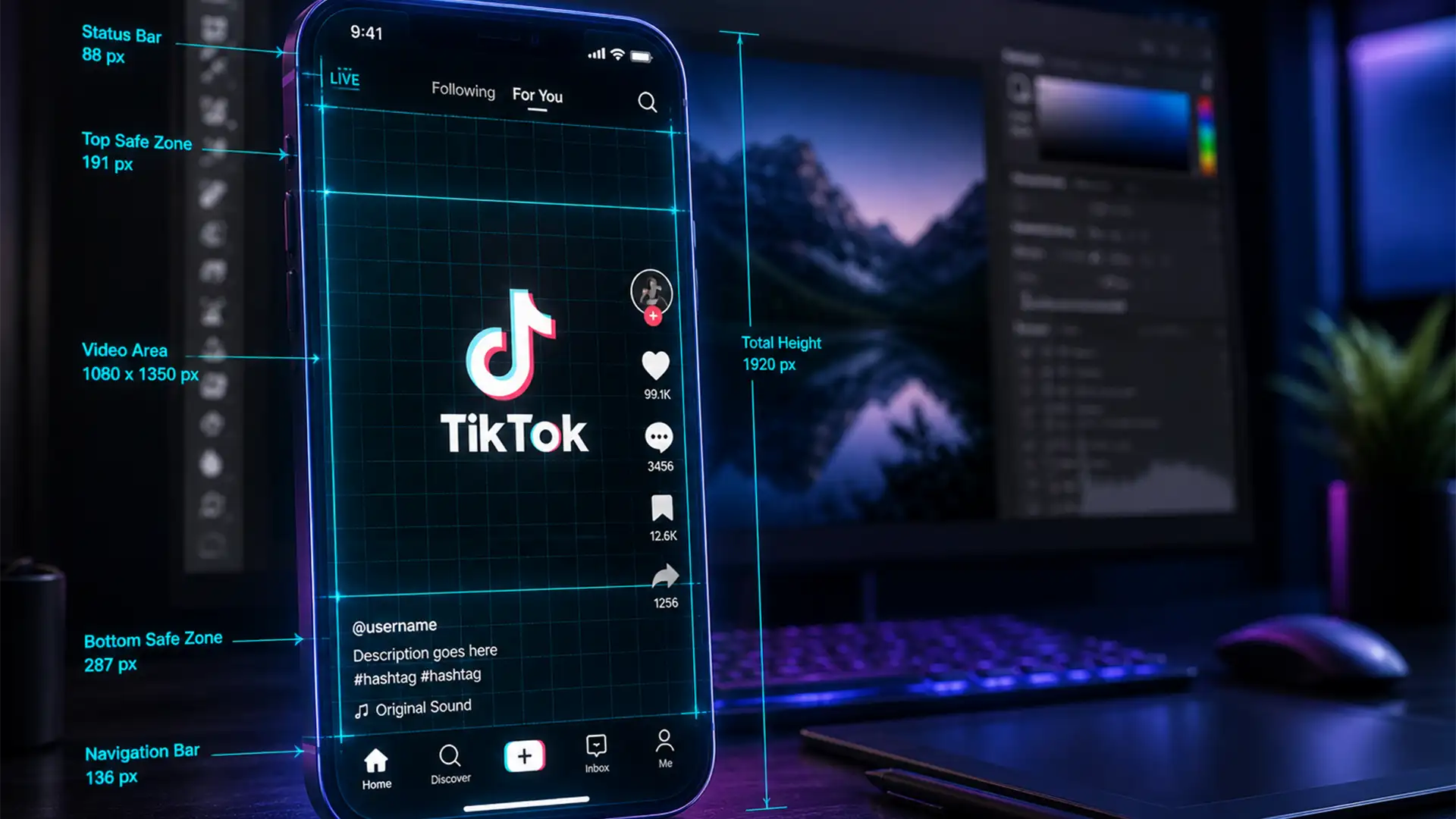

You’ve spent hours perfecting your latest short-form video or e-commerce ad, only to upload it and realize TikTok’s new 2024 interface completely covers your call-to-action. Frustrating, right? With the recent introduction of the expanded TikTok Shop banner, anchor links, and dynamic auto-captions, the “unsafe” zones on the platform have drastically increased. Content creators and brands are actively losing engagement and sales because critical text is hidden behind right-side interaction icons or bottom overlays. If you want to stop guessing and start converting, you need a precise TikTok safe zone PSD template 2024 shop banner setup. Here is exactly how to build it.
Understanding the 2024 TikTok UI Changes
TikTok’s latest interface update introduced significant spatial changes, specifically tailored for e-commerce integration. While the standard canvas size remains 1080×1920 pixels (an aspect ratio 9:16), the overlay elements eat up much more screen real estate than they did in previous years.
Here is the exact pixel breakdown of the 2024 unsafe zones:
- Right Side: The interaction panel (profile, like, comment, save, share, audio) occupies approximately 140px from the right edge.
- Bottom Area: The caption area dynamically expands to include TikTok Shop product links, anchor links, and auto-captions. You now need a safe margin of at least 400px to 450px from the bottom.
- Top Area: The Following/For You tabs and Live status icons require a 150px clearance from the top.
- Left Side: A minimal 20px padding is recommended to keep text from touching the absolute edge of the screen.
How to Set Up Your TikTok Safe Zone Guides in Photoshop
For users on Photoshop v24.x to v25.x, creating a pixel-perfect template is straightforward. You can apply these methods to standard documents or individual artboard setups.
Method 1: The Quick Fix (Photoshop Guide Layout)
The fastest way to establish your boundaries is by utilizing Photoshop’s built-in grid tools.
- Open Photoshop and create a new document at 1080×1920 pixels.
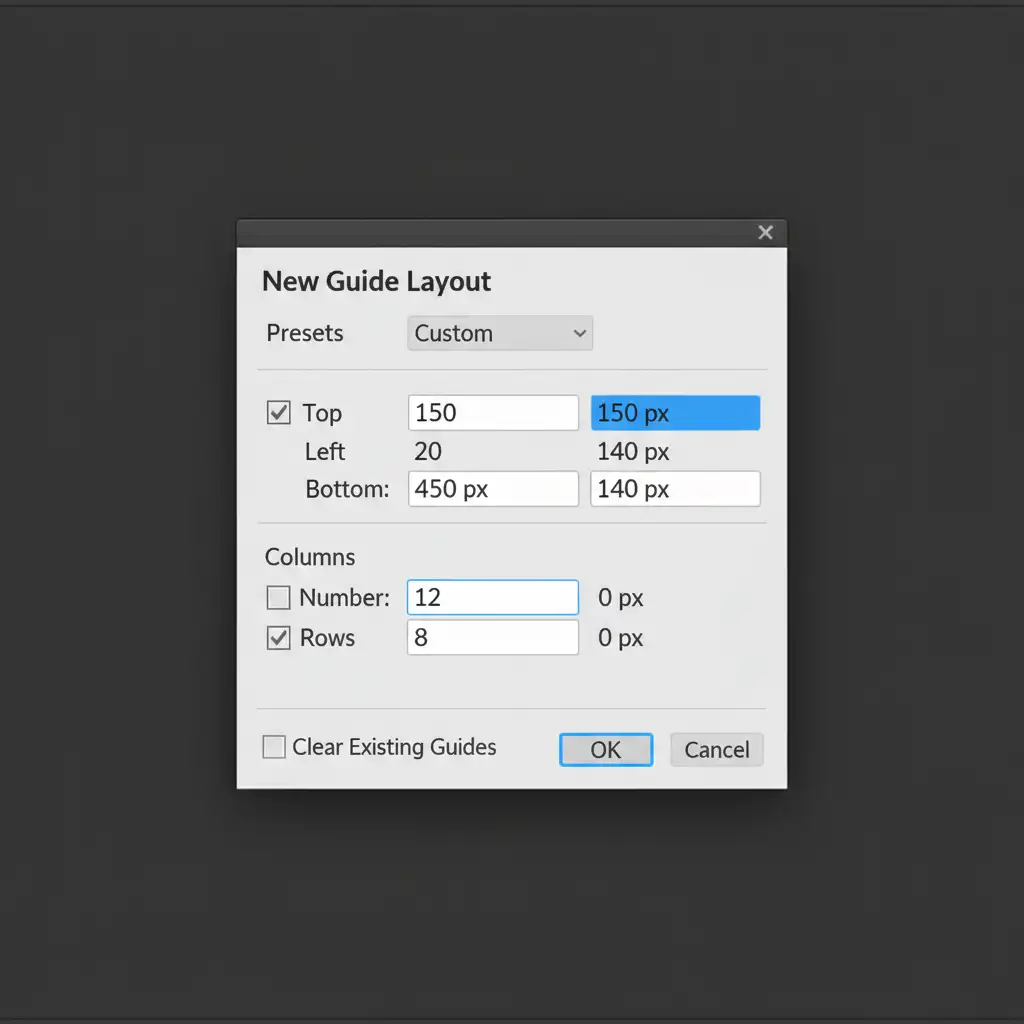
- Navigate to View > Guides > New Guide Layout.
- Clear any default column/row settings.
- Check the Margin box and input the exact 2024 TikTok UI values: Top 150px, Bottom 450px, Right 140px, Left 20px.
- Save this as a preset for future campaigns.
Method 2: The Pro Workaround (Smart Object UI Overlay)
If you prefer a visual reference rather than relying solely on safe zone guides, the smart object method is the industry standard for graphic designers.
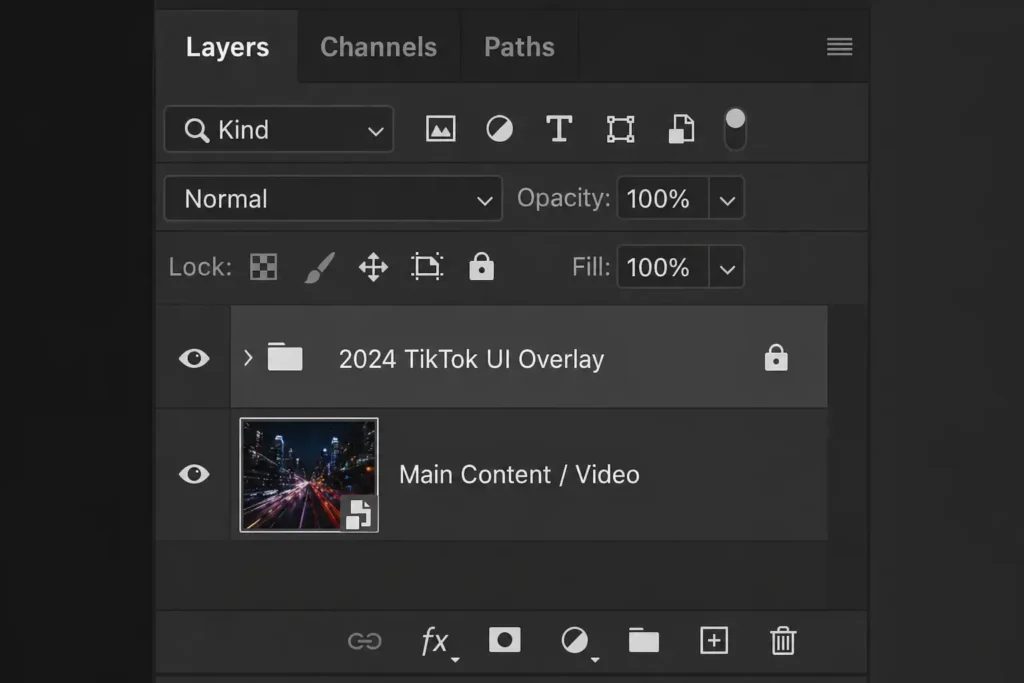
- Download or create a transparent PNG of the 2024 TikTok UI (including the new TikTok Shop banner).
- Place this PNG as the top layer in your PSD and lock the layer.
- Place your background video or image layer underneath it.
- Right-click your media layer and select Convert to Smart Object.
- You can now double-click the smart object to edit your artwork. The locked UI overlay in the main document serves as a visual boundary, allowing you to position text and graphics perfectly. Simply toggle the overlay’s visibility off before your final export.
By utilizing this method, you prevent the disastrous scenario where your primary marketing message is obscured by e-commerce elements.
Exporting for Crisp Quality (Avoiding TikTok Compression)
Even if your text is perfectly placed within the safe zones, incorrect export settings can ruin your file. TikTok’s compression algorithms are notoriously aggressive, often resulting in video compression artifacts and color shifting on mobile screens.
Method 3: The Technical Deep-Dive for Perfect Exports
To ensure your shop banners and video text remain razor-sharp:
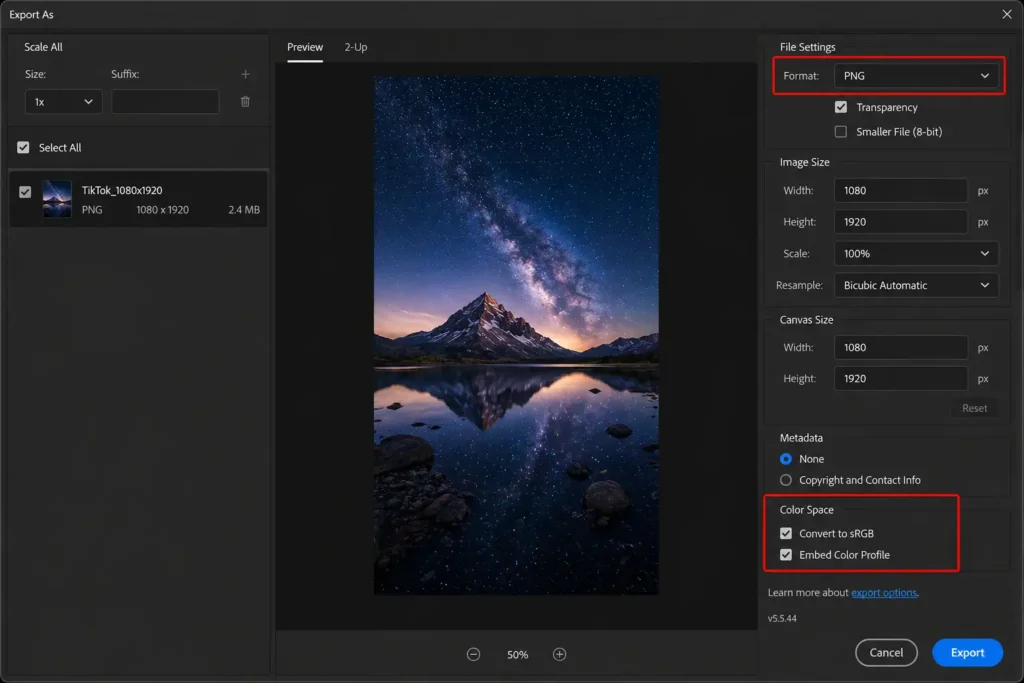
- Navigate to File > Export > Export As.
- Select your format: choose MP4 if rendering video through Photoshop, or JPG/PNG for static shop banners.
- If you have complex vector shapes, rasterize them before exporting to ensure edge fidelity.
- Crucial Step: Under the Color Space section, ensure both Embed Color Profile and Convert to sRGB are checked. Mobile devices utilize the sRGB color profile; failing to convert your file will result in dull, washed-out colors when viewed on a phone.
Stop Losing Sales to Bad Formatting
Mastering the TikTok safe zone PSD template 2024 shop banner layout is essential, but it is also time-consuming. When you are managing a brand, your time is better spent on strategy and growth, not tweaking pixel margins in Photoshop to avoid UI overlays.
Ensure your social media and e-commerce campaigns are visually perfect every single time. Hire Image Work India and Cloud Retouch for professional video editing, bulk image retouching, and custom graphic template design. Our expert design team stays ahead of platform updates so your content always looks flawless, converts higher, and never suffers from hidden text or compression artifacts. Contact us today to streamline your creative pipeline!




