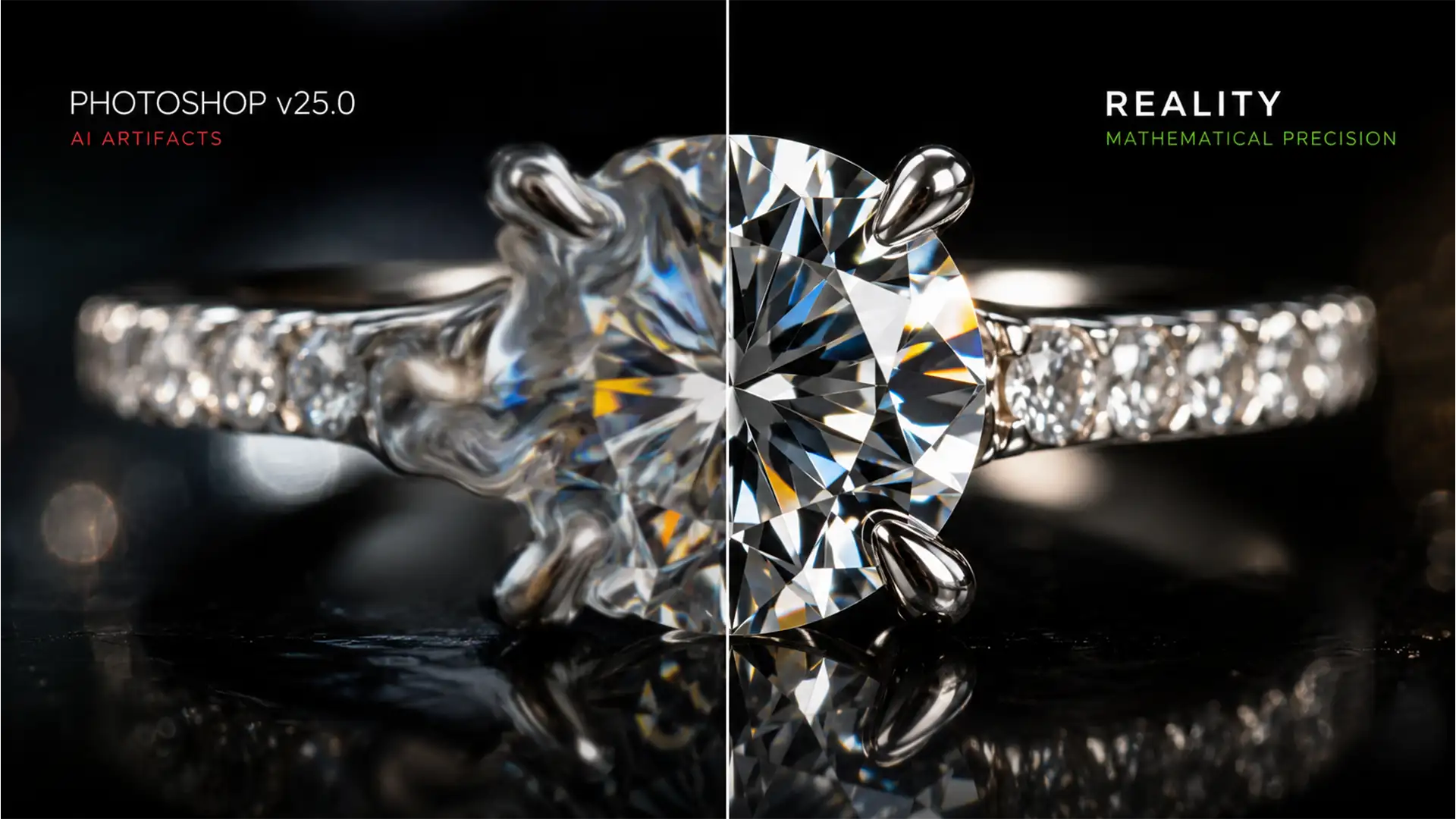

Are your high-end jewelry photos suddenly looking like melted plastic? If you have been using Photoshop v25.0 or later to clean up rings and necklaces, you have likely encountered a frustrating reality: AI tools routinely destroy the structural integrity of gemstones. When you try to remove a reflection or dust spot, the algorithm averages out the pixels, leaving you with missing facet junctions and a total loss of optical fire.
If you need to fix generative fill diamond artifacts, you cannot rely on the AI to correct itself. Restoring the mathematically precise geometry of a gemstone requires manual intervention. In this guide, we will break down three professional methods to rescue your diamonds from AI distortion and restore perfect, natural sparkle.
Why Photoshop Generative Fill Fails on Diamond Facets
Generative AI models are trained on billions of images to recognize patterns, but they lack an understanding of physics and 3D geometry. Diamonds rely on exact angles to reflect and refract light—a phenomenon known as dispersion or “optical fire.”
When Generative Fill attempts to reconstruct a diamond facet, it guesses the pixel values based on surrounding colors. This averaging effect obliterates the sharp, contrasting lines of the facet junctions. The result is a soft, blurry mess that immediately ruins the standard of high-end jewelry retouching.
3 Methods to Fix Generative Fill Diamond Artifacts
To restore your gemstone imagery, you need to combine targeted AI prompting with advanced manual retouching techniques. Here are three ways to rebuild your facets.
Method 1: The Quick Fix (Micro-Targeting & Prompt Engineering)
The biggest mistake retouchers make is selecting the entire diamond or a massive chunk of the ring when using Generative Fill. The larger the generation zone, the higher the chance of structural failure.
Instead, use micro-targeted selections. Select only the specific damaged area or a single facet. Furthermore, do not leave the prompt blank or use generic terms like “diamond.” You must force the AI to prioritize geometry.
- Use the Lasso Tool to select only the damaged artifact zone.
- Open the Contextual Task Bar.
- Enter specific prompt engineering: “sharp geometric diamond facets” or “high contrast facet junction.”
- Generate and cycle through the variations to find the closest geometric match.
Method 2: The Pro Workaround (Symmetrical Cloning & Frequency Separation)
When prompt engineering fails to deliver the necessary precision, you must manually rebuild the stone. Because diamonds are cut symmetrically, you can often borrow intact facets from the opposite side of the gem.
This method uses Generative Fill merely as a base layer to remove the initial distraction (like a heavy reflection), followed by precise manual reconstruction.
- Apply Generative Fill to remove the unwanted element, accepting the soft AI artifacts as a temporary base.
- Create a new blank layer above your AI layer.
- Select the Clone Stamp Tool and set the sample mode to ‘Current and Below’.
- Carefully clone intact diamond facets from the opposite side of the stone to replace the melted AI pixels.
- Pro Tip: If the texture feels off, run a Frequency Separation action. This allows you to clone the sharp structural lines (High Frequency) without disrupting the underlying color and light (Low Frequency).
Method 3: The Technical Deep-Dive (Luminosity Blending & Noise Matching)
The most glaring giveaway of an AI artifact is the loss of native camera grain and contrast. AI generations often look “too clean” and lack the tonal depth of a real photograph. To seamlessly integrate AI-generated pixels with the rest of the diamond, use this luminosity blending technique.
- Extract Luminosity: Add a Black and White adjustment layer to isolate the intact luminosity values of the surrounding real diamond.
- Restore Contrast: Change the blend mode of your corrected layers to Luminosity. This forces the AI-generated areas to adopt the exact contrast and lighting of the underlying original image, restoring depth.
- Match Grain Structure: AI pixels have zero camera noise. Create a new layer filled with 50% gray, set its blend mode to Overlay, and go to Filter > Noise > Add Noise. Ensure “Monochromatic” is checked. Adjust the amount to perfectly match the raw grain structure of the original photograph.
The Ultimate Solution for High-End Jewelry Retouching
While Generative Fill is a powerful tool, it simply cannot replace the mathematical precision and expert eye required for high-end jewelry imagery. Fixing generative fill diamond artifacts manually takes time, deep technical knowledge of frequency separation, and an absolute dedication to structural integrity.
If your studio is losing hours trying to force AI to understand optical dispersion, it is time to bring in the experts.
Image Work India and Cloud Retouch specialize in pixel-perfect, high-end jewelry retouching. Our team of professional retouchers doesn’t rely on automated guesswork; we manually ensure that every facet junction is razor-sharp, every reflection is intentional, and the natural optical fire of your diamonds is flawlessly preserved.
Stop settling for melted AI artifacts. [Contact Image Work India today] to elevate your jewelry catalog with flawless, professional retouching.




